Cybersecurity Management for Banks and Branches

ABC is a desktop app that verifies how prepared banks are against 'cybersecurity threats.'
Introduction

**Enhancing Cybersecurity for Banks: A UX Case Study** With rising cyber threats in the financial sector, banks need robust solutions to assess and strengthen their security. This cybersecurity application enables banks and branches to **monitor systems, detect vulnerabilities, and take proactive measures** through interactive reporting, security scans, and risk analysis. In this case study, I will outline my **UX design process from low to high fidelity**, focusing on intuitive workflows, data visualization, and user-centric solutions that drive effective decision-making.

Role

Mid. Level UX / UI Designer

Industry

EdTech

Year

2022

Duration

2 Weeks
a cell phone on a table

User Research

Cyber Security Management manages corporate information security, proactively detects threats, and helps you track and take preventive measures against security vulnerabilities with instant response.

ABC is a desktop app that verifies how prepared banks are against 'cybersecurity threats.' ABC conducts a comprehensive analysis of all the issues in the bank and then provides the bank with access to an online interactive report based on the results.

Problems and Goals

The task is to design this interactive report (website & app) that the bank's board members can use to answer the following questions:

How good or bad is my cybersecurity? 'How prepared is my bank for any cyber attack threat?'
What should I do against security threats? 'Honestly, it's impossible to fix every threat, what should I do?'
What can bank branches do against security threats? 'Apart from central management, what can branches do against cyber threats?

Solution must include

Because a lot of data accumulates in the technical background, it is very important to verify this data. The Security Checklist should be filterable and have a binary check verification feature when logging into the system.

This interactive report is designed for bank executives and board members, who need to:

  1. Assess the Bank’s Cybersecurity Status – Understand how secure or vulnerable the bank is to cyber threats.

  2. Prioritize Actions – Since fixing every threat is not feasible, they need to know which issues require urgent attention.

  3. Define Responsibilities – Identify what central management and individual branches can do to mitigate risks.

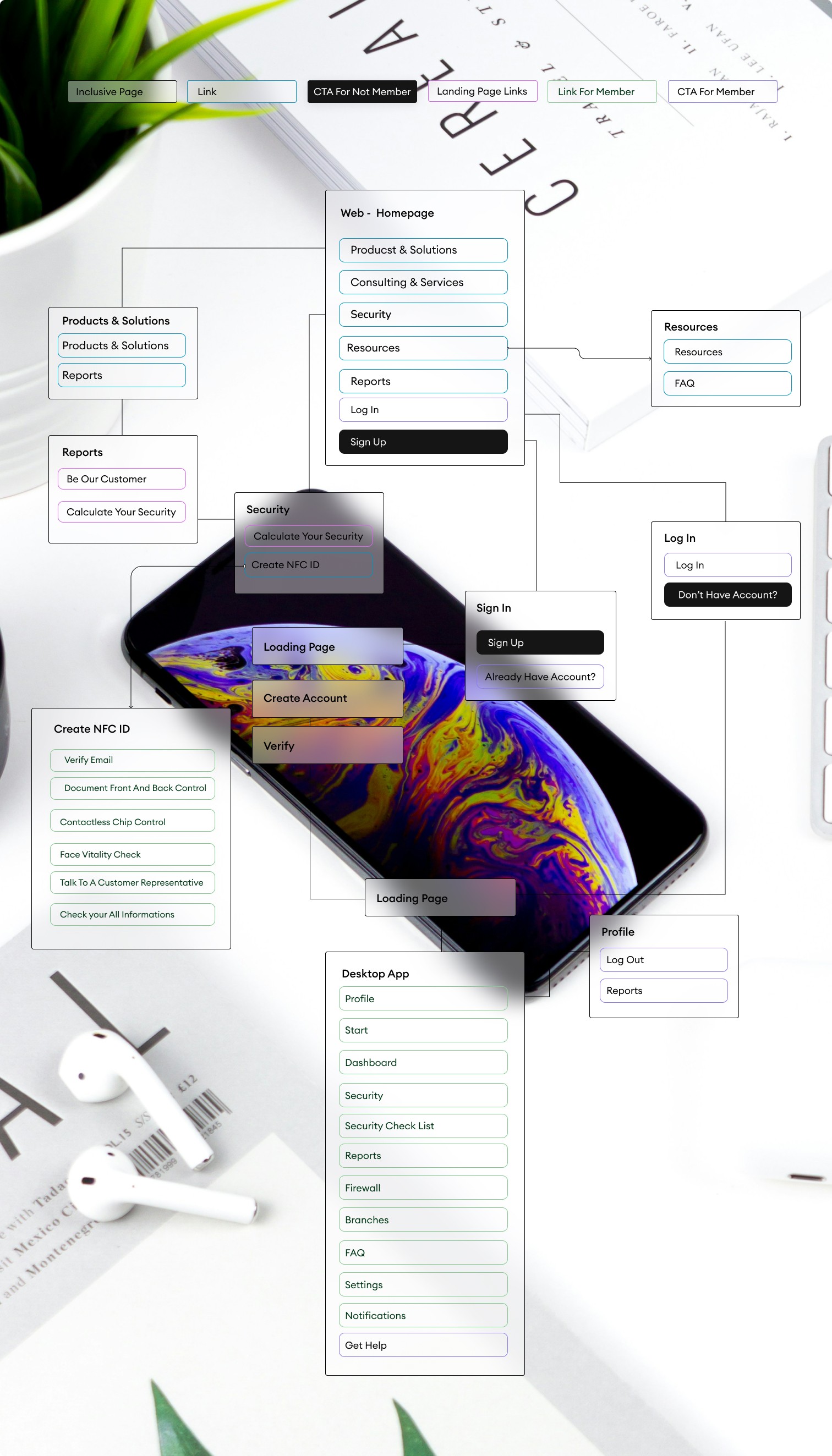
    Information Architecture

Stage 2. Ideation & Conceptualization

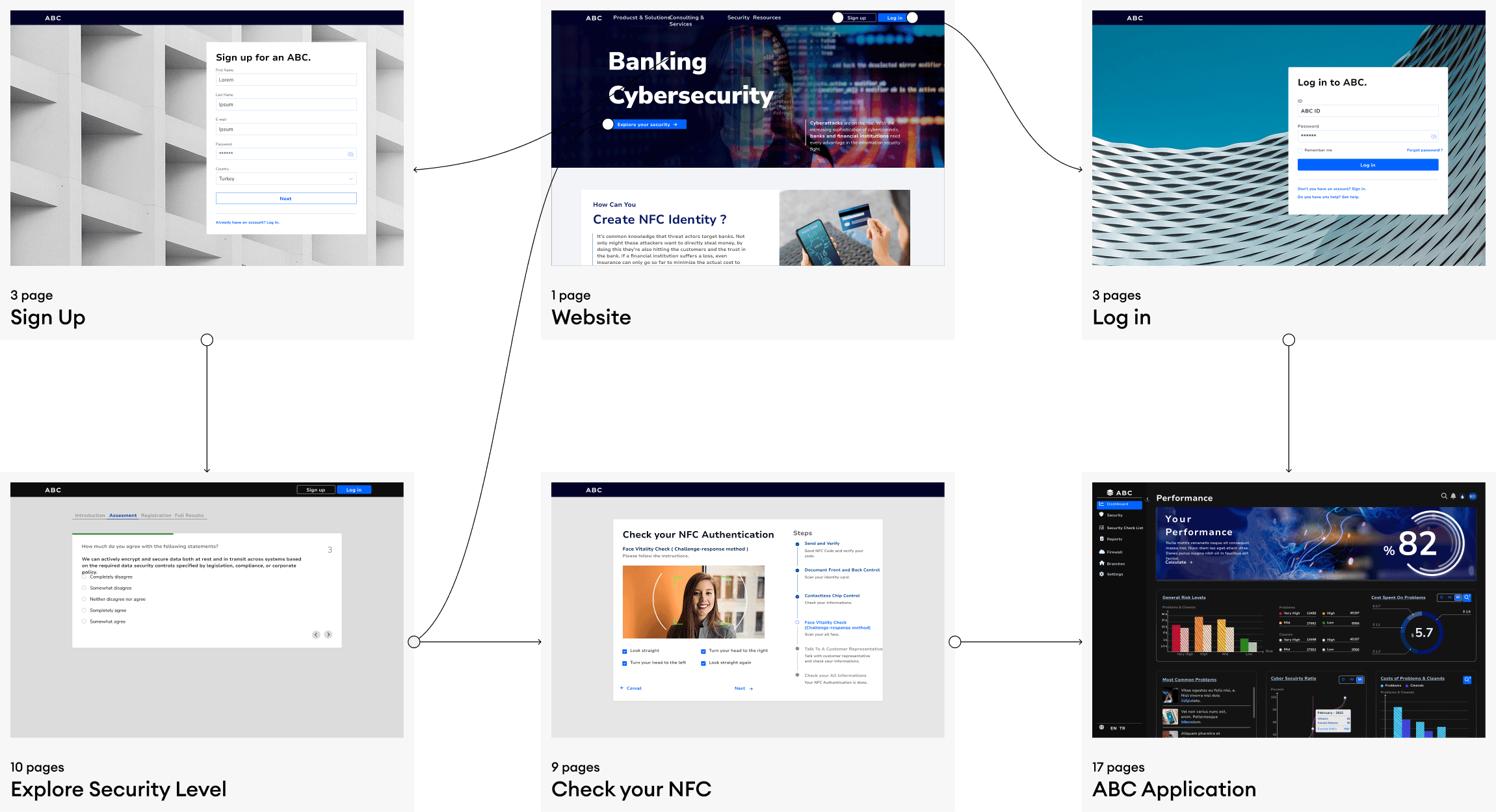
The journey of user experience begins with a website. After verifying the users who register on the system, they need to filter data flows and control the overall system for cybersecurity. Therefore, I started with a design that allows for verification through the website.


Stage 3. Design Execution

To design the cybersecurity application for banks and their branches, I focused on creating a data-driven, interactive, and user-friendly system that simplifies complex security insights while ensuring usability, clarity, and efficiency.

I structured the interface around a central dashboard, providing executives with a comprehensive security overview, including real-time risk levels, last scan results, and critical vulnerabilities. The Security Scanner, with its Protection Shield UI, was designed to give an at-a-glance assessment of the bank’s cybersecurity status while allowing users to perform Quick, General, and Branch-Specific scans.

To enhance decision-making and response efficiency, I integrated a risk prioritization system, categorizing threats based on severity and impact. The Action Center allows users to take immediate steps, escalate issues, and receive recommendations tailored to their security needs. Additionally, I designed a Risk History Dashboard, enabling executives to track security trends over time and evaluate progress.

By balancing data visualization, interactive components, and a structured workflow, this design ensures that both central management and branch-level users can efficiently monitor, analyze, and respond to cybersecurity threats in a streamlined and effective manner.

Solution - 1 // Website & Log in or Sign up Page

This website features a design that informs customers and also directs users who want to register or log in to other flows.


Solution - 2 // Check NFC Authentication

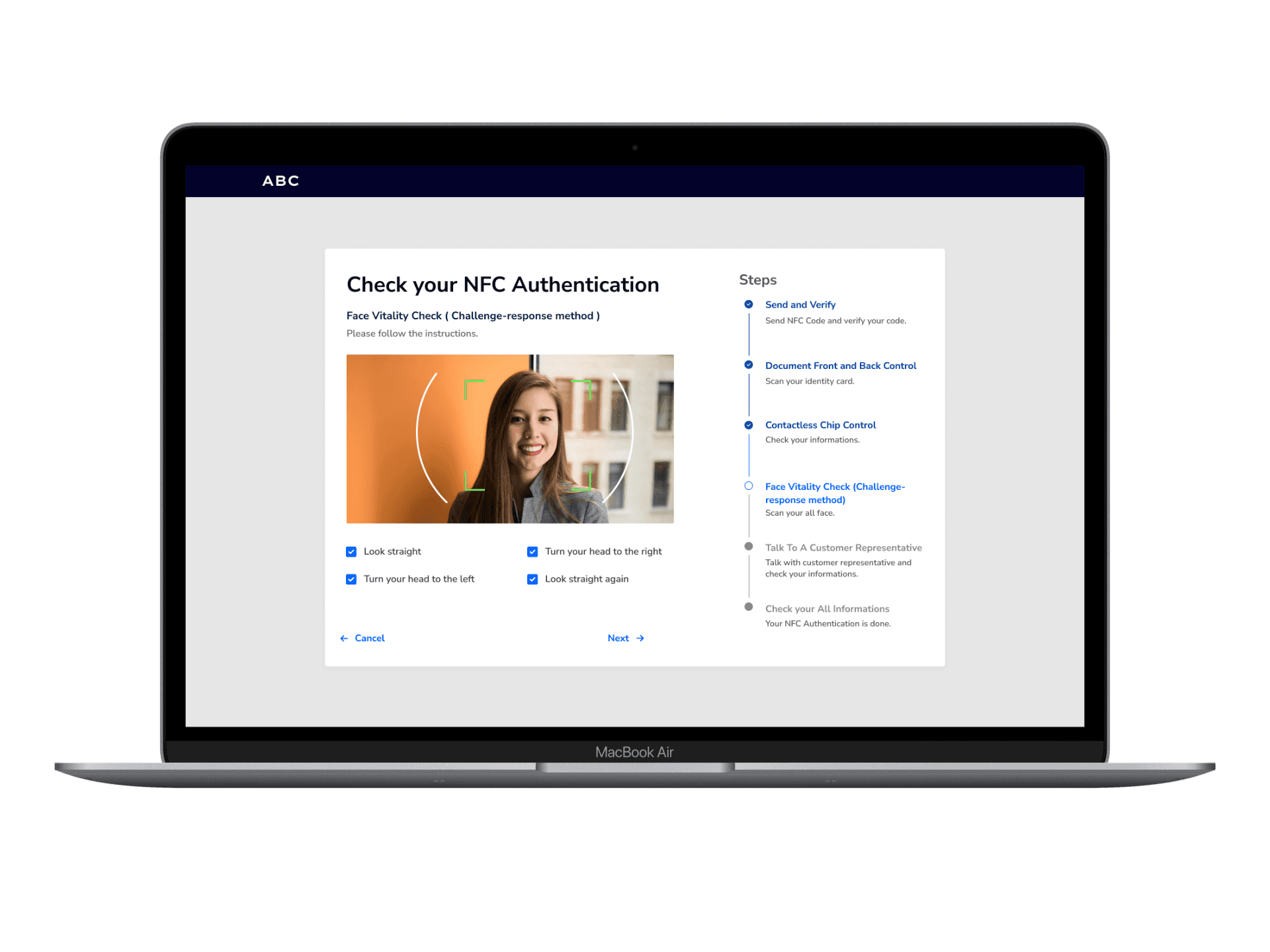
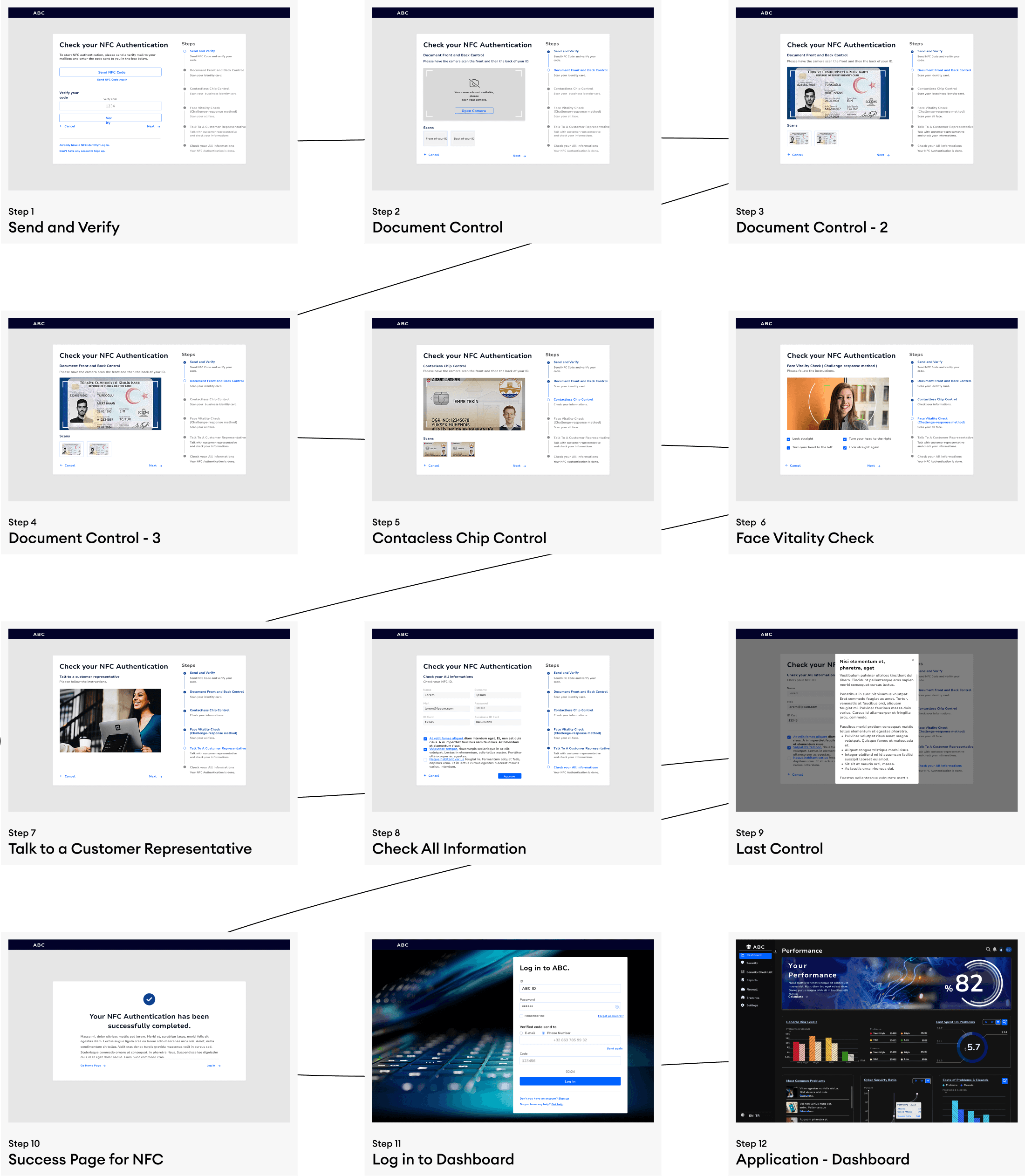
For the identity verification process that users need to complete to register, I designed an NFC Authentication flow. In this process, I specifically chose a progress bar.

User Research

Cyber Security Management manages corporate information security, proactively detects threats, and helps you track and take preventive measures against security vulnerabilities with instant response.

ABC is a desktop app that verifies how prepared banks are against 'cybersecurity threats.' ABC conducts a comprehensive analysis of all the issues in the bank and then provides the bank with access to an online interactive report based on the results.

Problems and Goals

The task is to design this interactive report (website & app) that the bank's board members can use to answer the following questions:

How good or bad is my cybersecurity? 'How prepared is my bank for any cyber attack threat?'
What should I do against security threats? 'Honestly, it's impossible to fix every threat, what should I do?'
What can bank branches do against security threats? 'Apart from central management, what can branches do against cyber threats?

Solution must include

Because a lot of data accumulates in the technical background, it is very important to verify this data. The Security Checklist should be filterable and have a binary check verification feature when logging into the system.

This interactive report is designed for bank executives and board members, who need to:

  1. Assess the Bank’s Cybersecurity Status – Understand how secure or vulnerable the bank is to cyber threats.

  2. Prioritize Actions – Since fixing every threat is not feasible, they need to know which issues require urgent attention.

  3. Define Responsibilities – Identify what central management and individual branches can do to mitigate risks.

    Information Architecture

Stage 2. Ideation & Conceptualization

The journey of user experience begins with a website. After verifying the users who register on the system, they need to filter data flows and control the overall system for cybersecurity. Therefore, I started with a design that allows for verification through the website.


Stage 3. Design Execution

To design the cybersecurity application for banks and their branches, I focused on creating a data-driven, interactive, and user-friendly system that simplifies complex security insights while ensuring usability, clarity, and efficiency.

I structured the interface around a central dashboard, providing executives with a comprehensive security overview, including real-time risk levels, last scan results, and critical vulnerabilities. The Security Scanner, with its Protection Shield UI, was designed to give an at-a-glance assessment of the bank’s cybersecurity status while allowing users to perform Quick, General, and Branch-Specific scans.

To enhance decision-making and response efficiency, I integrated a risk prioritization system, categorizing threats based on severity and impact. The Action Center allows users to take immediate steps, escalate issues, and receive recommendations tailored to their security needs. Additionally, I designed a Risk History Dashboard, enabling executives to track security trends over time and evaluate progress.

By balancing data visualization, interactive components, and a structured workflow, this design ensures that both central management and branch-level users can efficiently monitor, analyze, and respond to cybersecurity threats in a streamlined and effective manner.

Solution - 1 // Website & Log in or Sign up Page

This website features a design that informs customers and also directs users who want to register or log in to other flows.


Solution - 2 // Check NFC Authentication

For the identity verification process that users need to complete to register, I designed an NFC Authentication flow. In this process, I specifically chose a progress bar.

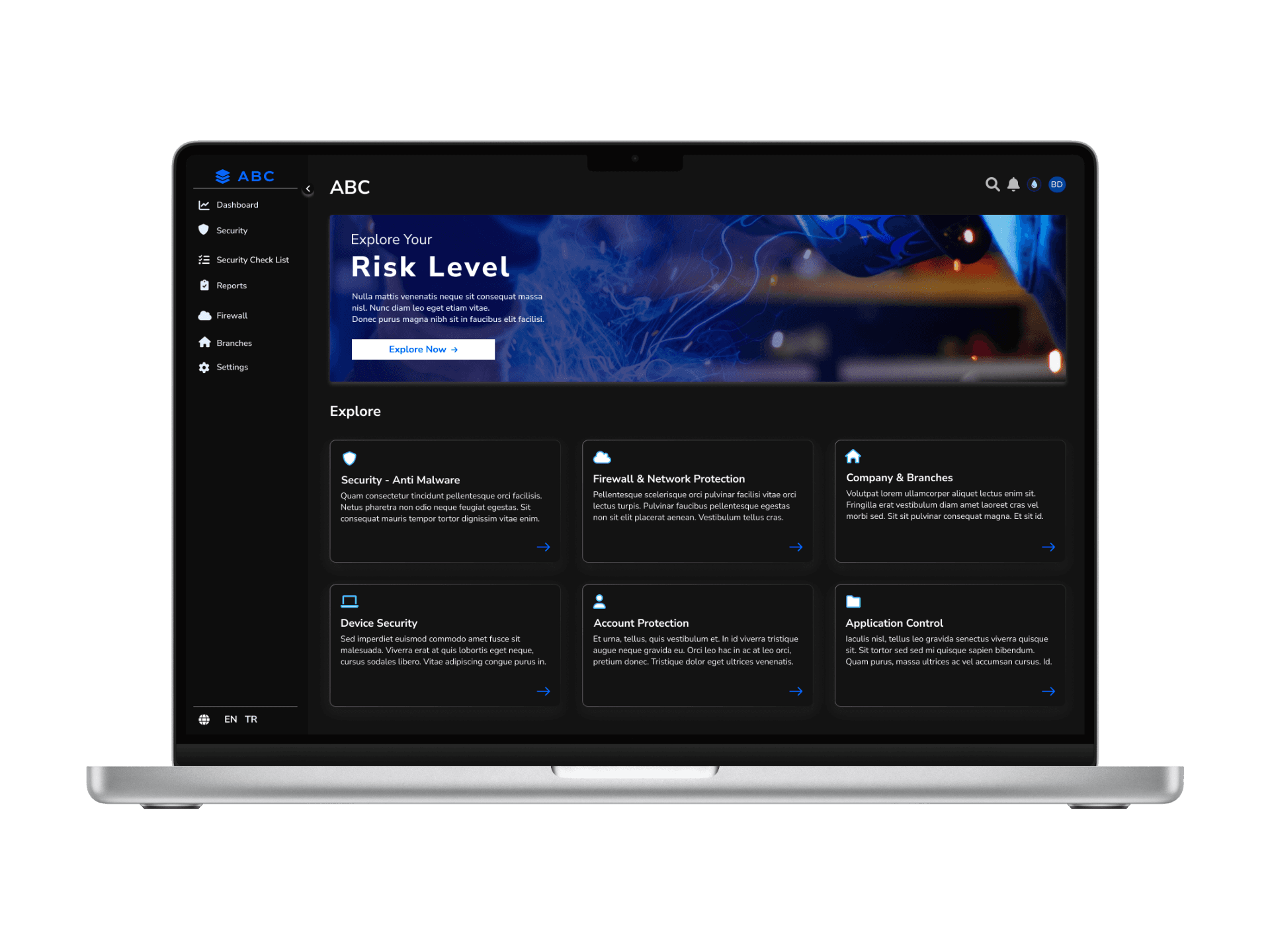
Solution - 3 // Application - Home Page

I designed the general screen that users encounter after successfully completing their registration to help them learn how to use the platform's features by classifying the available options. Since it is a detailed platform that could grow with evolving needs, I chose to use a menu to prevent users from always returning to the home page.
Solution - 4 // Application - Dashboard

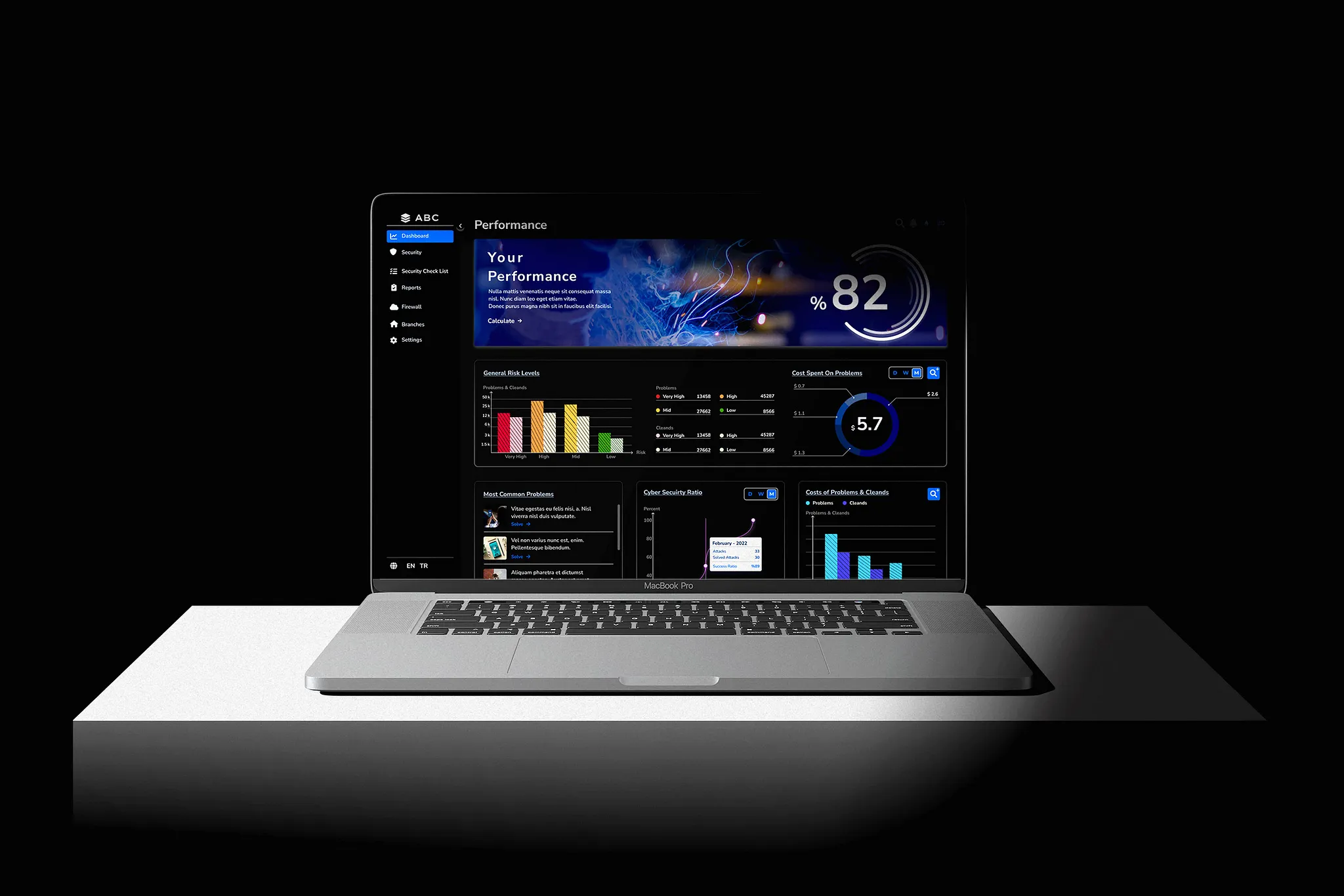
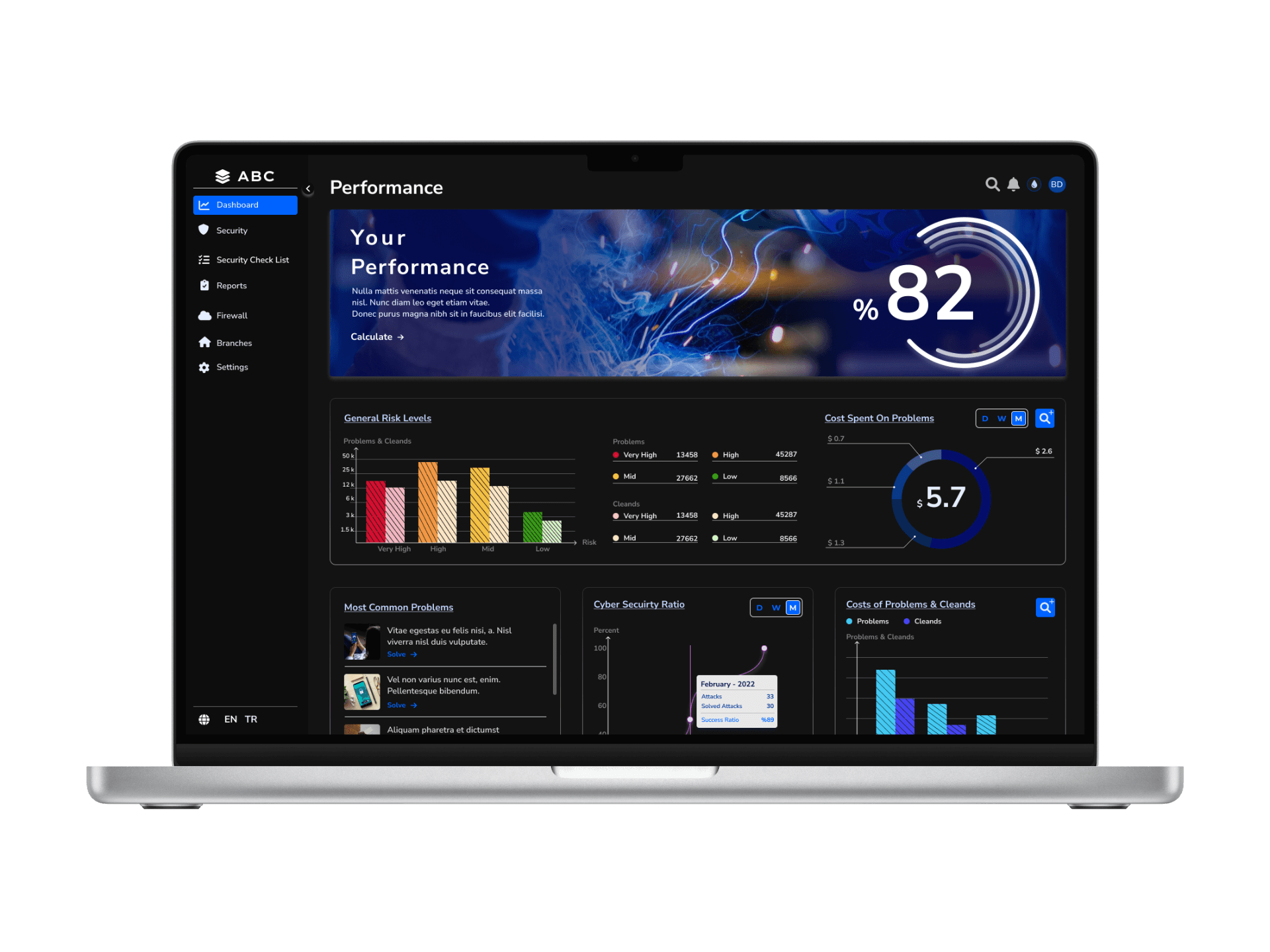
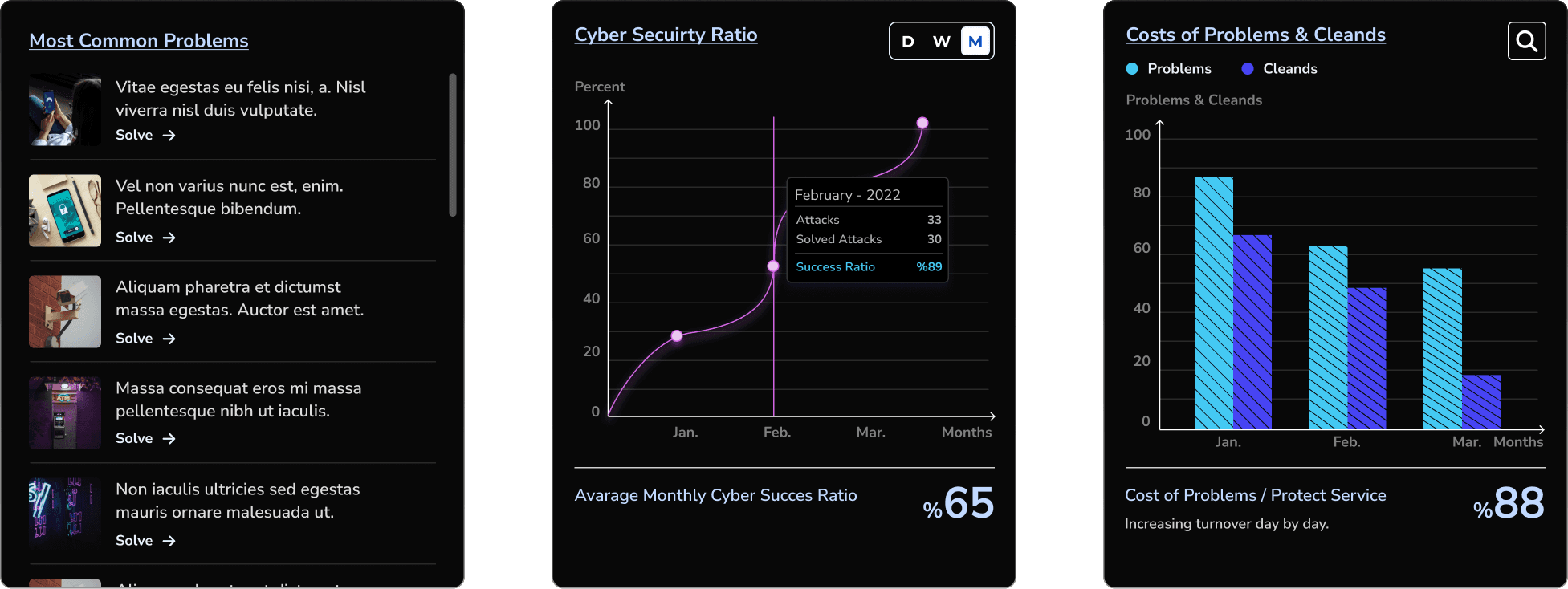
For users who have uploaded their data, I aimed to create user flows using various statistical displays for features they might always want to know. Although the overall design of the dashboards uses a monochromatic color scheme, I chose semantic colors for displaying material-scale damage. I used line chart bars to enhance readability.
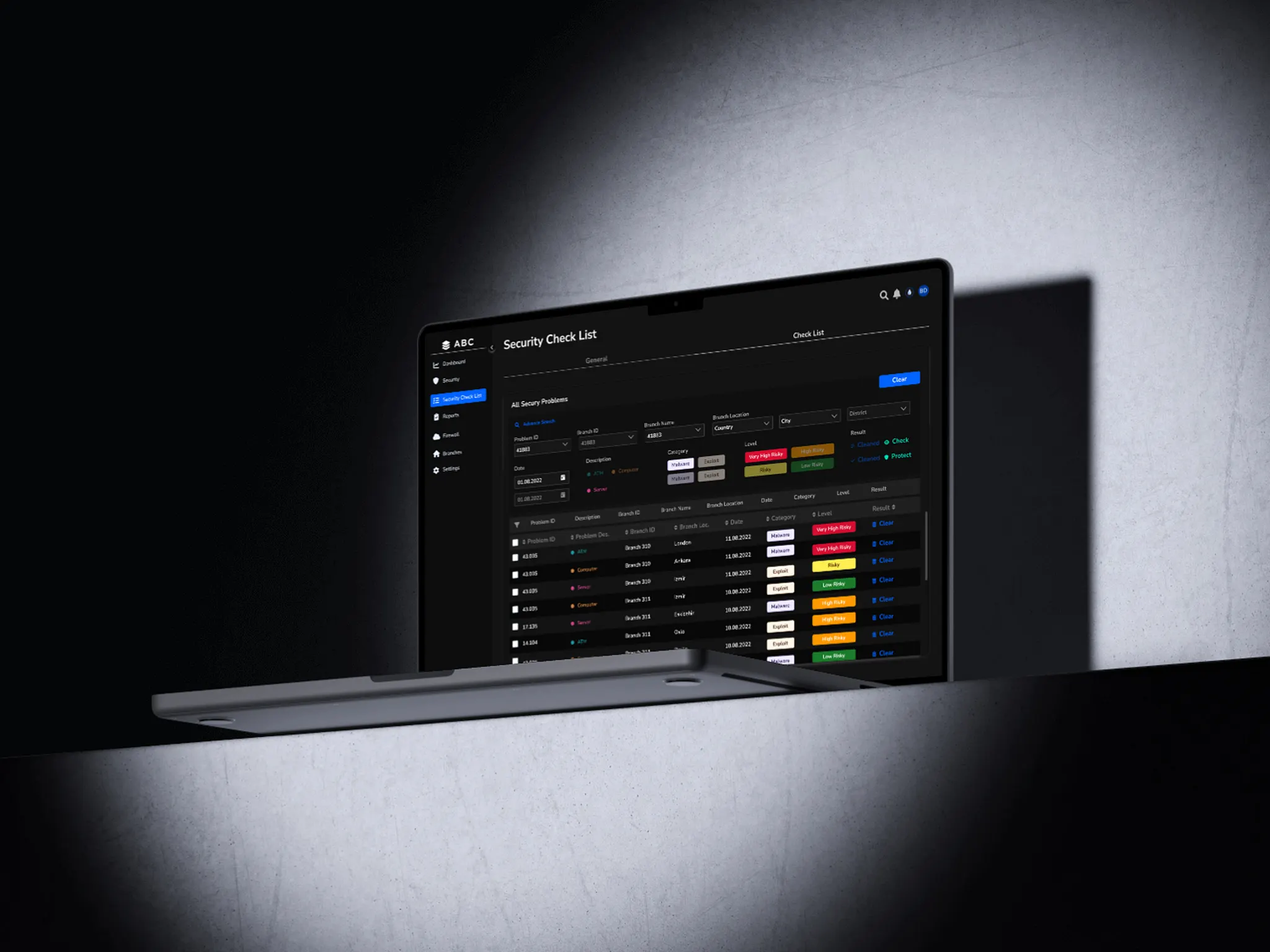
Solution - 6 // Application - Security Check List

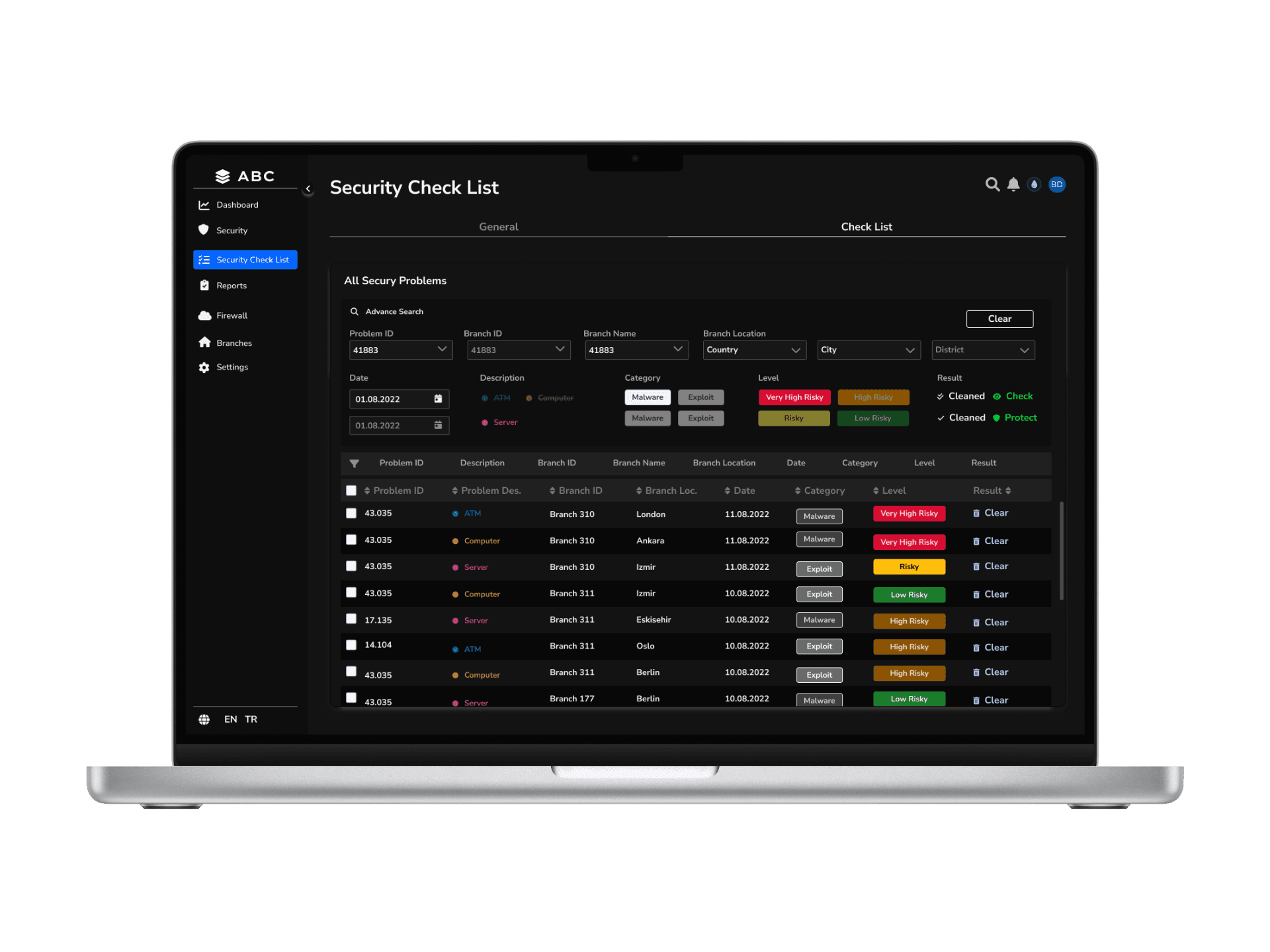
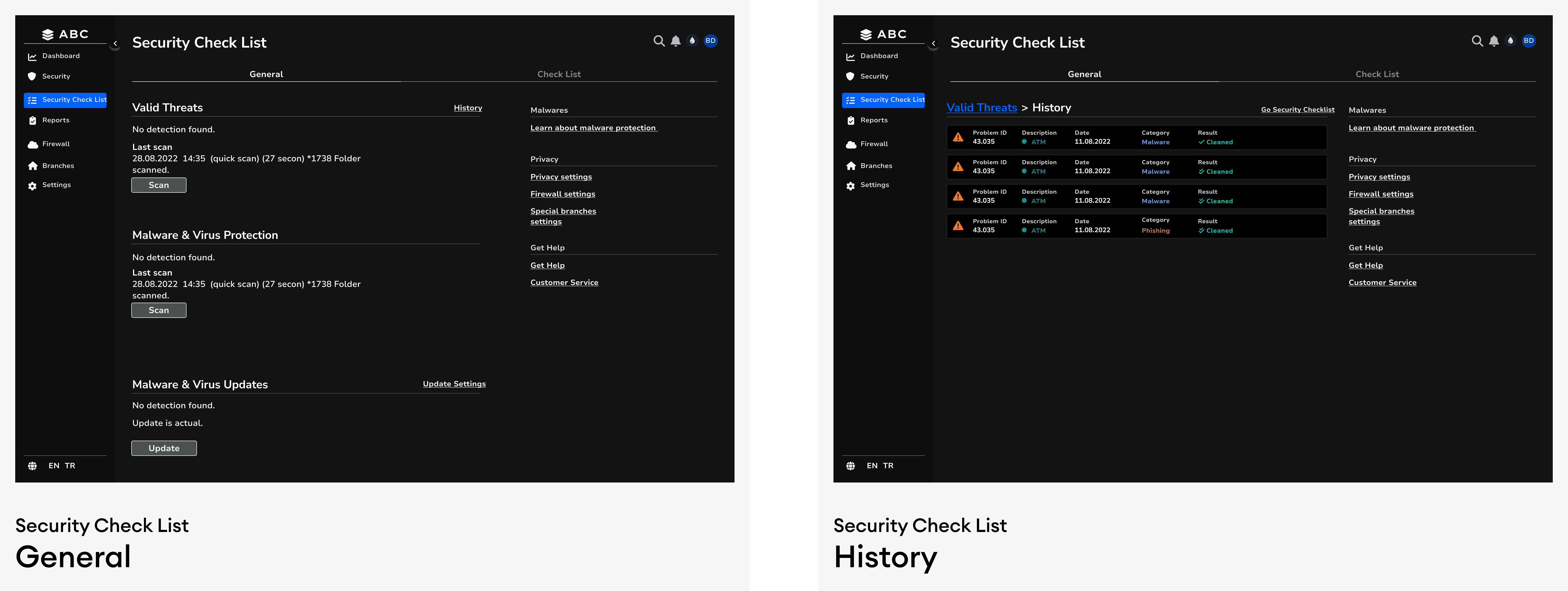
I designed a checklist that allows users to easily filter the data they have uploaded and take action on the selected issues. This structure enables problems to be listed in a non-historical order. Additionally, by going to the Problem Details page, users can track how frequently the same error recurs. Each audit results in 15,000 – 30,000 reported issues, making data visualization, filtering, and prioritization essential for usability.
  • Issue Prioritization Mechanism

    • Severity Filters: Small, Medium, Major, and Critical issues can be filtered.

    • Regional Segmentation: Differentiates security risks between the central bank and branches.

    • Responsibility-Based Sorting: Separates actions needed by central management from those required at branch level.

Color Coding

  • Green, Yellow, Orange, and Red represent different risk levels.

  • Critical threats in red, minor issues in yellow or blue for clear prioritization.
Hierarchy of Information

  • High-level summaries are displayed using large, prominent cards, while detailed insights are accessible through collapsible sections and tabs.

  • Users can always return to the Summary View with a dedicated button.


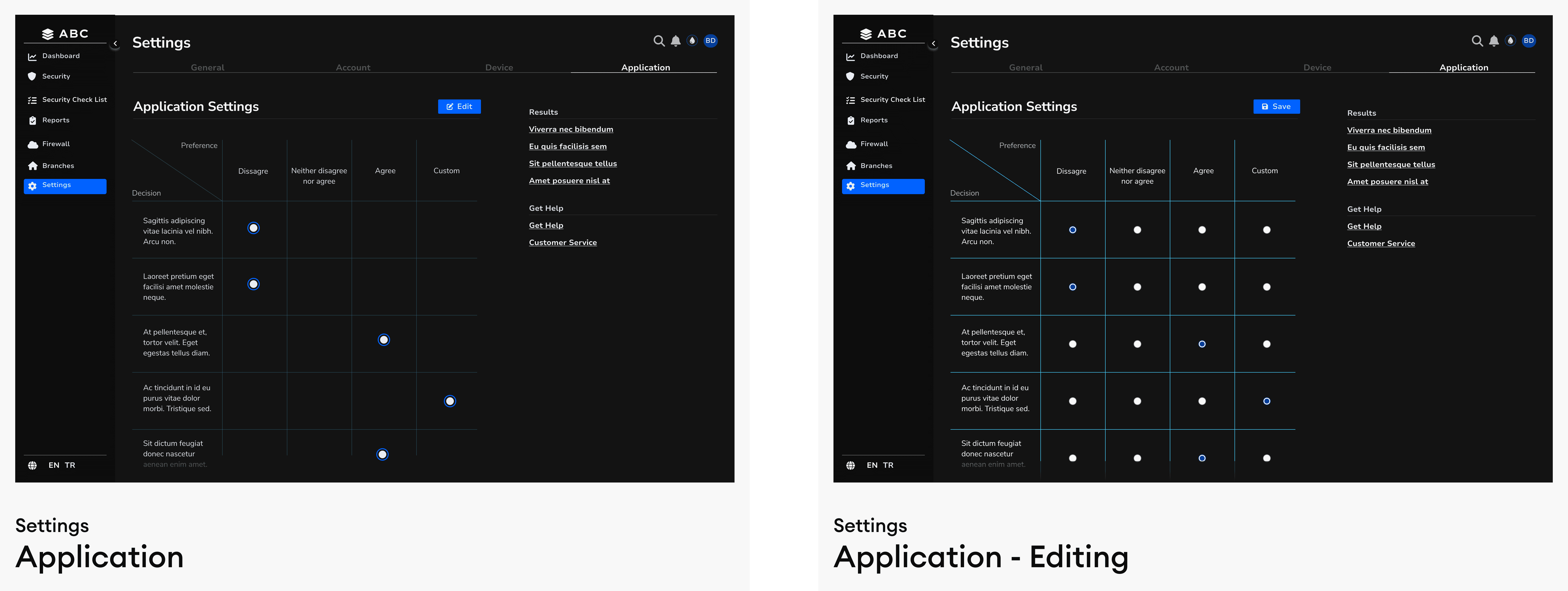
Solution - 6 // Application - Settings

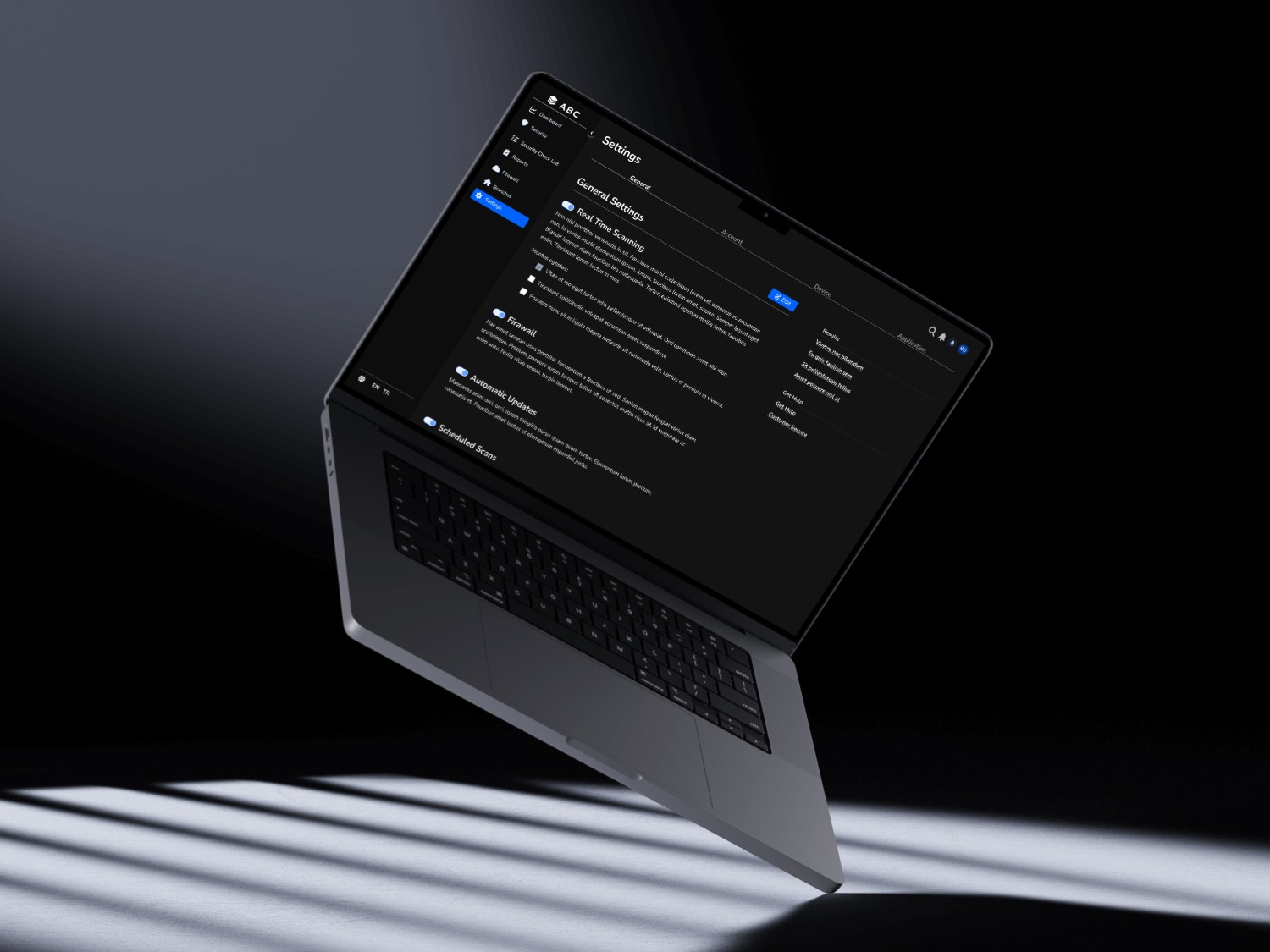
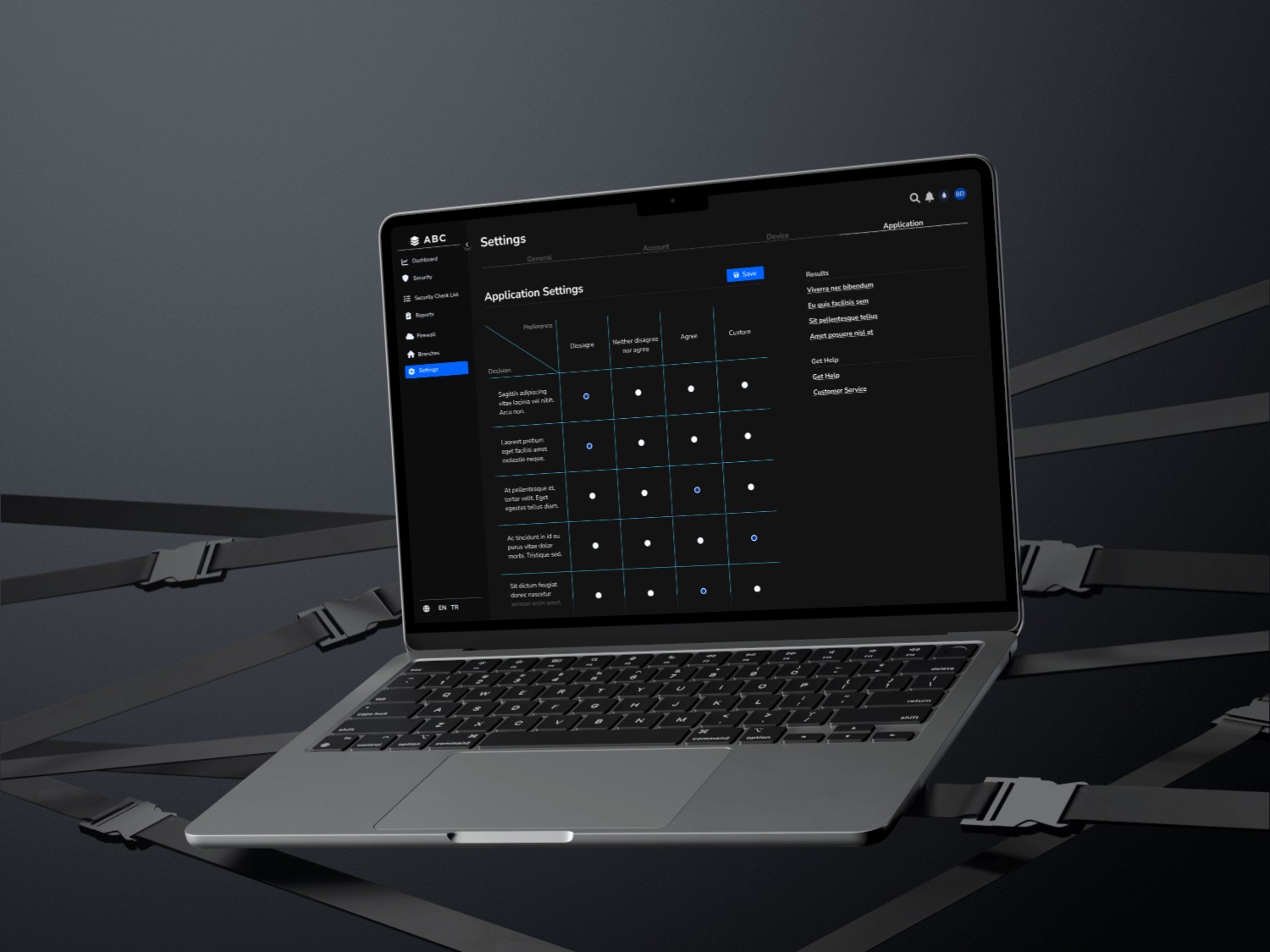
I designed a structured Settings menu to enhance usability and organization, dividing it into General, Account, Device, and Application sections. The Account section not only manages user profiles but also enables branch-level security monitoring, allowing administrators to oversee and control branch activities seamlessly.
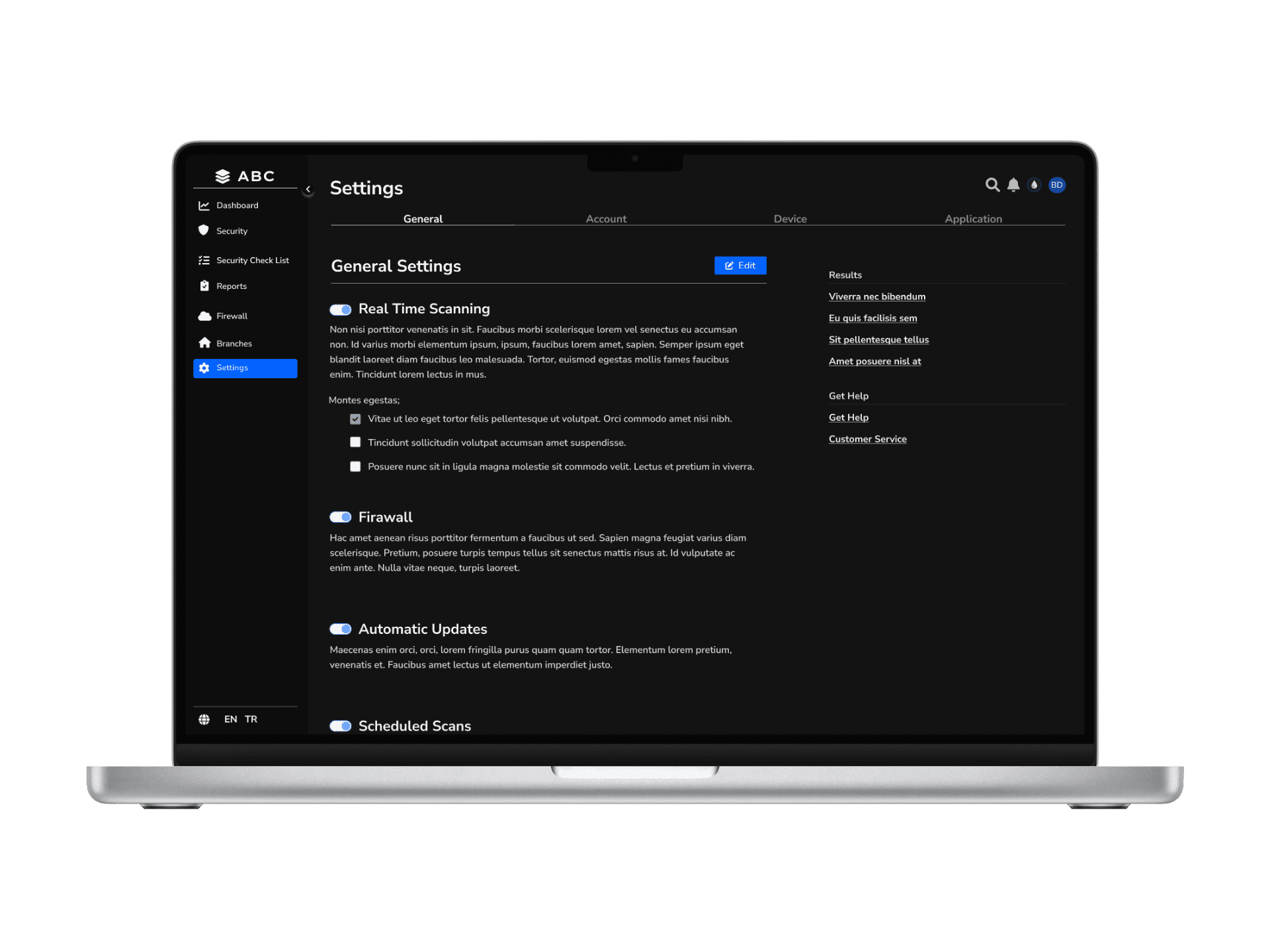
To ensure the most effective approach, I researched existing antivirus scanning applications and integrated industry best practices. My findings confirmed that this structured methodology aligns best with the case requirements, optimizing security management, usability, and scalability within the banking ecosystem.

Solution - 7 // Application - Security Scanner

To enhance cybersecurity monitoring and risk management, the Security Scanner plays a crucial role in providing real-time protection insights. This tool not only visualizes the bank’s current security status but also offers customized scanning options to detect vulnerabilities at different levels. By integrating historical risk trends and instant scan feedback, the Security Scanner enables executives to make data-driven decisions and take immediate action to strengthen their bank’s cybersecurity posture.
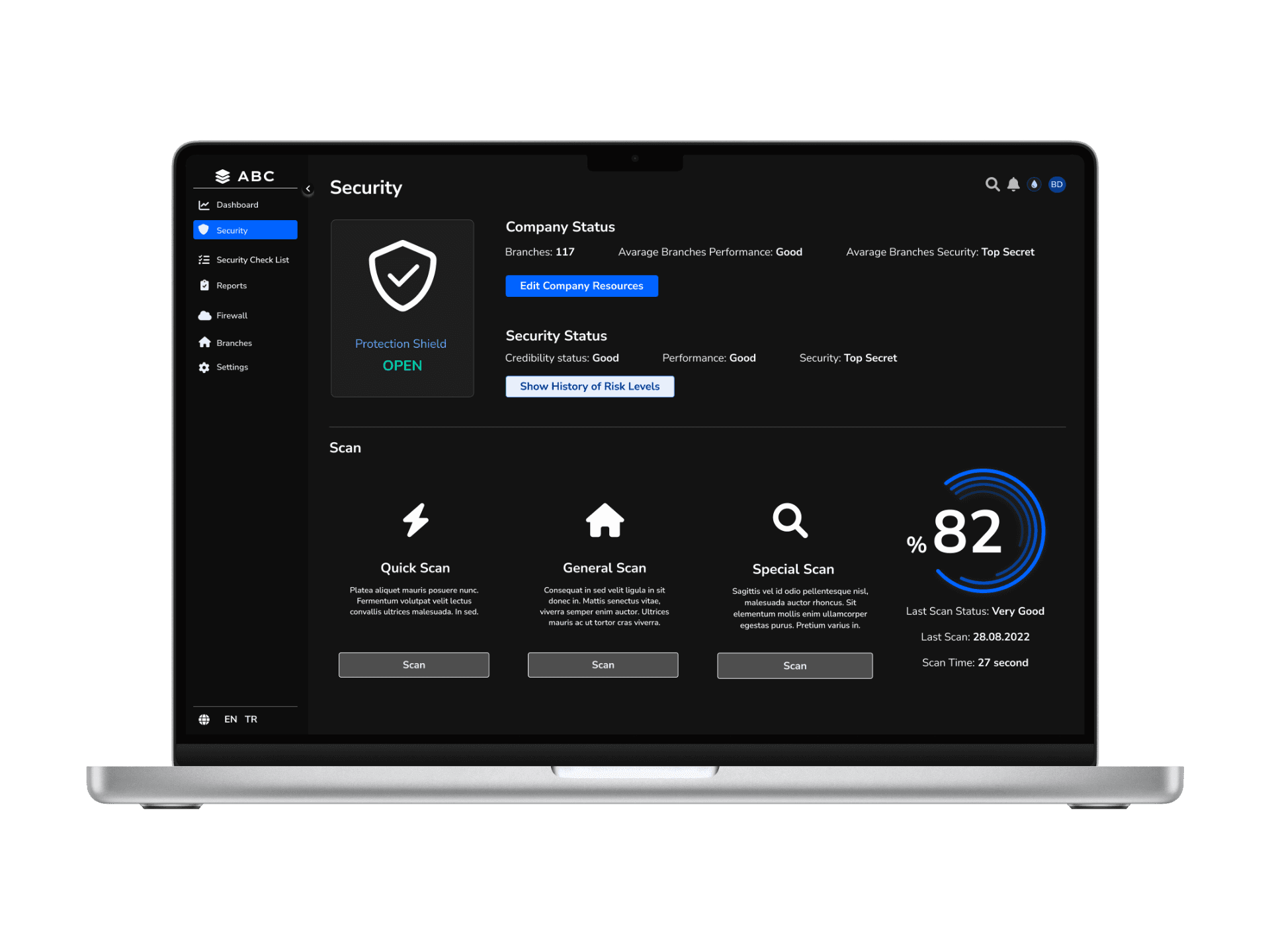
Security Scanner Section (Protection Shield UI)

  • A dynamic protection shield visualization updates based on the bank’s real-time security status.

  • Displays last scan results and the timestamp of the most recent scan.

Scanning Options

  1. Quick Scan – Fast and high-level risk assessment.

  2. General Scan – In-depth security scan across the entire banking system.

  3. Branch-Specific Scan – Focused security checks for individual branches.
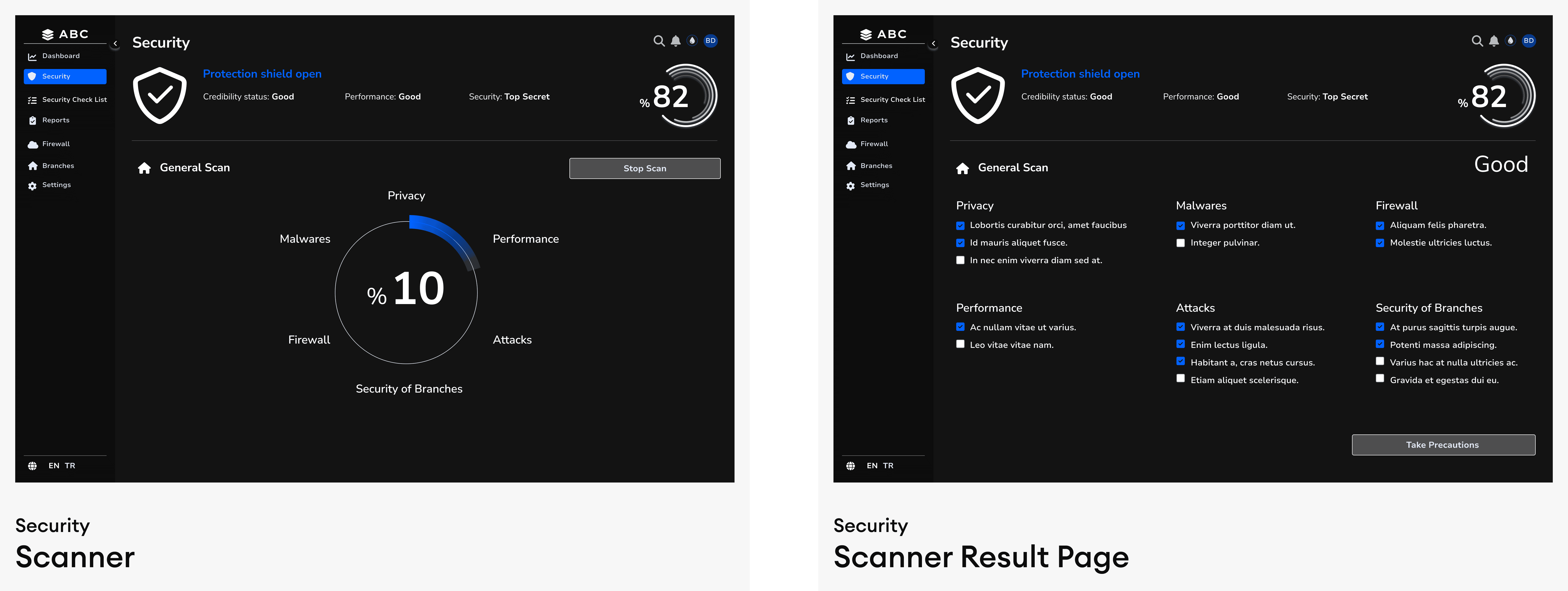
Scan History & Risk Trends

  • The “Show Risk History” section enables users to compare past and current security levels.

  • Trend indicators (e.g., graphs) display risk progression over time.


Solution - 8 // Application - General Reports Page

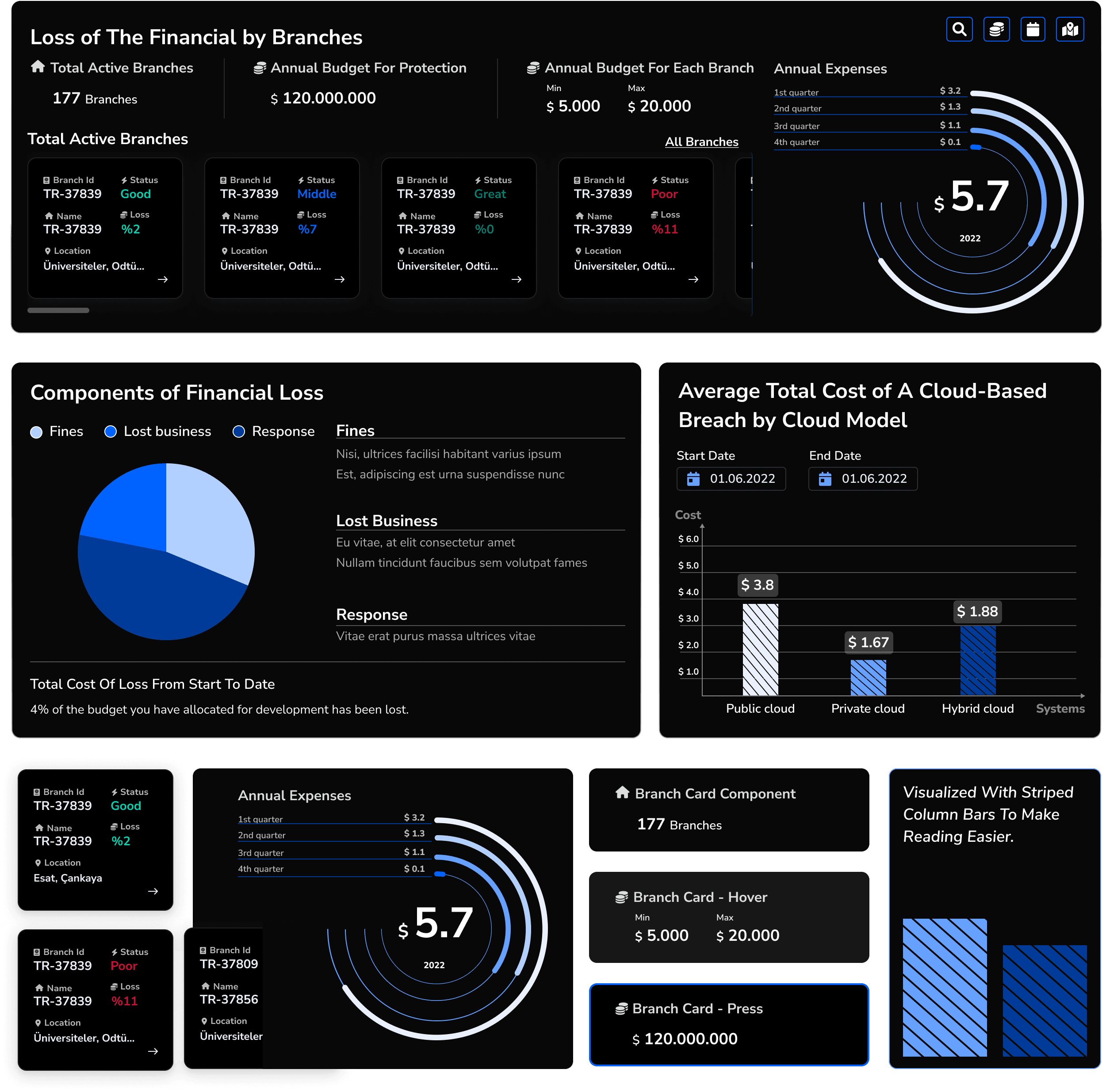
I designed the Report Page to display risk levels both at a general and branch-specific level, incorporating financial impact insights related to existing or potential security threats. From the main report dashboard, users can navigate to branch-specific or overall security details for deeper analysis.

To enhance visual clarity and data hierarchy, I utilized shades of the primary brand color, allowing semantic colors (red, green, blue, yellow) to stand out more effectively. Additionally, I implemented striped bar charts to improve data readability, ensuring a clearer and more structured representation of risk insights.
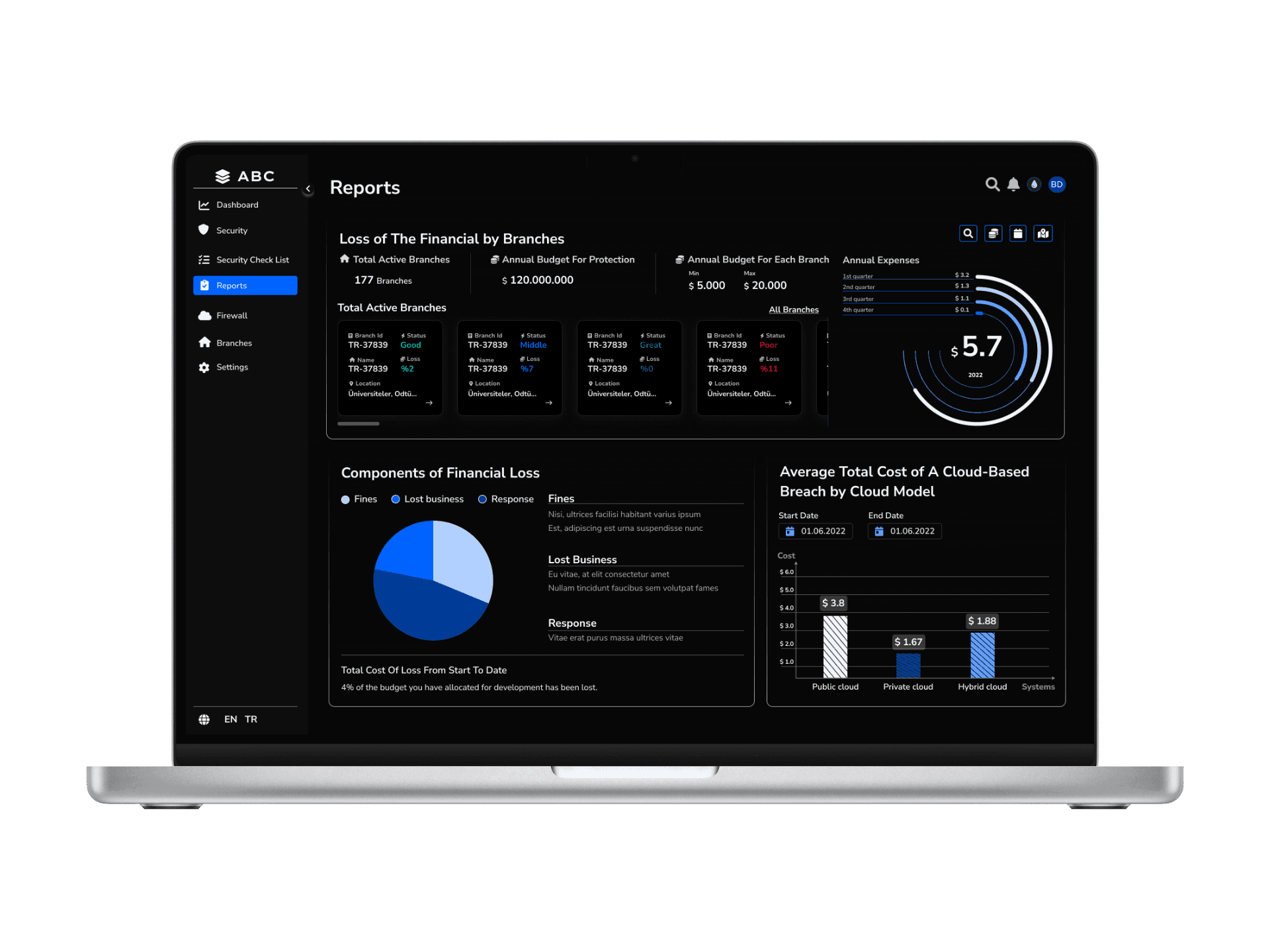
Overview Dashboard

  • A Security Score (e.g., 0-100) provides a quick assessment of the bank’s cybersecurity posture.

  • The most critical security risks are highlighted.

  • Threat categories (Good, Poor, Exploits, etc.) are visualized through graphs.

Detailed Report Page

  • Clicking “View Details” leads to an in-depth breakdown of security threats.

  • Regional Breakdown: A comparative view of security risks across different branches.

Actionable Steps & Recommendations

  • Central Management Strategies: Recommendations for overarching security policies.

  • Branch-Level Actions: A separate section outlines what branches can do independently.

Reflections

This UX design approach transforms complex cybersecurity data into an intuitive, actionable interface, allowing users to quickly grasp critical threats and take informed actions.

It reflects your expertise in managing data-heavy projects, analyzing user behaviors, and developing effective interaction models and design systems.
a cell phone leaning on a ledge
a pair of cell phones on a concrete block
a cell phone with a yellow rectangular screen

Other projects

All rights reserved by Buse Bilger © 2025

All rights reserved by Buse Bilger © 2025

All rights reserved by Buse Bilger © 2025

Create a free website with Framer, the website builder loved by startups, designers and agencies.